What Is InstaDoodle? How the Doodle Video App Works Step by Step
What is InstaDoodle? See how it works: type a prompt, let DoodleAI draw the characters, compose scenes, add animation, voiceover and music, then export.
- Author
- Strong Health Tips Editorial Team
- Published
- Updated
- Reading time
- 7 min read
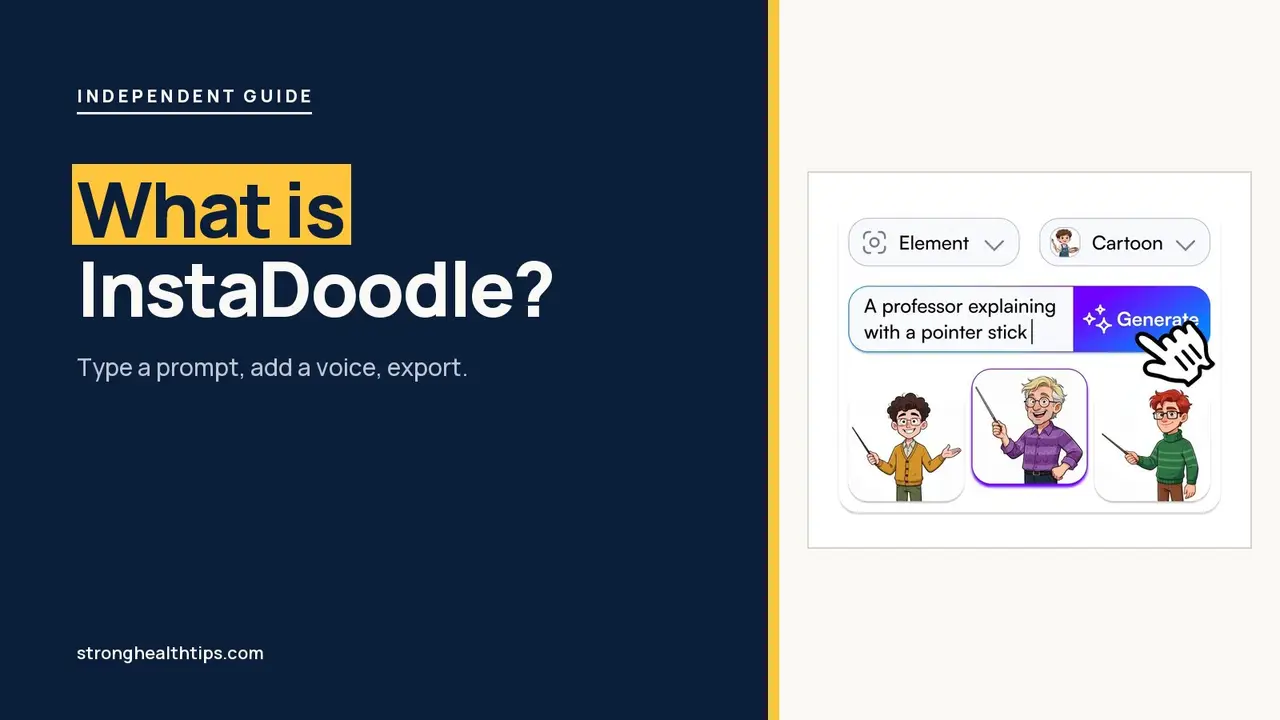
What is InstaDoodle? Put simply, it is a cloud web app for whiteboard-style doodle videos that you build inside a browser. You describe a scene in words, DoodleAI sketches the characters and props, and you line the pieces up in an editor before exporting the file. Nothing needs downloading, since the tool opens in a modern browser on Mac, Windows or another device, as the seller describes it. This walkthrough moves through the work in sequence, lays out what each monthly tier adds and points out the limits worth weighing first. Plans begin at $47 a month, and the exact tier and total appear on the order page ahead of any charge.
Start here
Describe your first scene
Type a short idea and watch DoodleAI sketch the first version. Tiers begin at $47 a month.
View the tiersWhat is InstaDoodle, and who uses it
The seller names training, onboarding, explainers, how-to and educational videos as the main uses, a broader list than it first appears. Picture a teacher turning a Year 9 water-cycle lesson into a drawn cloud that rains onto a hillside, with a narrator walking through each stage. Or a hardware shop filming a fitting guide for a tap washer, one sketched frame per step. Or a team lead preparing a welcome reel that guides new staff through the first week, one drawn scene per topic.
What these share is brief drawn scenes with narration laid over them. That is the shape InstaDoodle was built for. Longer interviews, screen captures of software and footage-based storytelling fall outside its strengths, where a different kind of product would serve the job better.
The five steps from prompt to export
- Write the prompt. A sentence or two describing the scene is enough. The seller says DoodleAI converts that text into characters, elements and backgrounds. Picture-to-doodle can start from an image instead.
- Arrange the frame. Drag-and-drop placement, your own uploaded pictures and an image editor with background removal all sit in one workspace.
- Pick the movement. Six animation types are listed (draw, wipe, slide, fade and pop-in), and slide transitions link one scene to the next.
- Record or generate audio. A synthetic voiceover or your own recording goes in, with background music beneath it.
- Render for your screen. Frame shapes include 16:9, 9:16, 4:5 and square. Standard is listed at 1080p HD, and Pro extends to 2K and 4K.
Checking each stage as you go catches problems early, and moving a caption or swapping one element is a small job. Regenerating an entire scene spends from the included AI credits, so lock the script before you start generating.
Edit in the browser
Build the scene, then export
Placement, narration, music and four frame shapes, all inside one browser tab.
Review the editor featuresDoodleAI styles and the built-in library
DoodleAI works across six AI styles the seller lists, among them caricature, cartoon and realistic. One idea can read as playful or exacting depending on the style you choose: a cartoon look fits a classroom, while a realistic one suits a product demonstration.
Libraries matter as much. Standard ships with 14+ templates and 1,000+ built-in doodle elements, according to the seller. Pro expands that to 3,000+ PRO elements and characters, plus 20 pro fonts, custom pro backgrounds and font uploads. For ordinary objects the built-in set is quick, while anything tied to your own shop or classroom is easier to bring in as a photo.
Picture-to-doodle is the other way in. The seller calls it AI image-to-sketch, so a product photo, an existing diagram or a rough drawing becomes a simpler illustrated version. Simple source images work best. One clear subject outperforms a crowded group photo, and it leaves more room for voice and captions. Save the cleaned-up version you like best, so the same image can serve later scenes.
Which monthly plan carries which features
Three monthly tiers appear in the seller’s list. The table covers the main differences, and the order page is where the specifics get confirmed.
| Plan | Monthly price | Main items the seller lists |
|---|---|---|
| Standard | $47 a month | 150 AI credits, drag-and-drop editor, picture-to-doodle, 1080p HD, 14+ templates |
| Pro | $67 a month | Everything in Standard, plus 3,000+ PRO elements, 2K and 4K export, a commercial license, VIP support and a 20-track music bonus |
| Agency | $127 a month | Everything in Pro, plus AI Wizard, InMotion and AI Voices with 6 voices in 30+ languages |
Only Pro and Agency carry the commercial license in that list, so a Standard subscriber should review the terms before any paid client work. The plan-by-plan list gives every feature line per tier, and the InstaDoodle hub brings the whole offer onto one page.
How credits show up in a build
Credits are the currency your plan spends, and the seller lists 150 on Standard. A running log helps: one row per scene noting the prompt, the attempts and whether the result reached the final edit. Across a few projects the log reveals which steps eat the allowance and how many videos a tier can carry. It also holds the figures you would need if the credits rule ever came into play. The first two projects usually set the pace for the rest, so start the log early.
Limits to weigh before you start
- Credits meter the work, and the seller notes that the cost per action may change, so long projects can overrun your estimate.
- AI output may fall outside exclusive copyright protection, so each scene and voice line deserves a look before it goes out.
- Billing renews monthly until the plan ends, and you can end it whenever you choose, according to the seller.
- The 60-day money-back guarantee exists, yet once more than half of the included AI credits are spent, no refund is possible.
A worked example: a how-to clip for a small shop
A hardware shop owner wants a short how-to for fitting a tap washer. A realistic scene list runs to four frames: tools arranged on the bench, the worn washer, the new washer seated, and a closing frame advising a slow restart of the water. Each frame calls for one prompt, a few elements and a single motion choice. The owner narrates in an everyday voice, exports 16:9 for the shop site and 9:16 for a phone post, and logs credits as the work goes. If the log approaches the 150-credit Standard figure, the order page is where to compare the tiers before more work gets added. The script is written and timed before recording, so the voice lines and the scenes line up from the first draft.
Plan the scenes
Count the scenes first
A scene list keeps the credit count easy to follow. Tiers from $47 a month.
Compare the tiersQuestions to answer before your first project
- Do the plan’s features cover every frame on your list?
- Does the commercial line on the plan cover the work you deliver?
- Are the export sizes right for the screen where the video will appear?
- Do the included credits cover one full video with room for a few regenerations?
Write the answers as a short list before you open the order page, and keep that list with your scene notes. When all four are yes, the tier fits. When one is no, compare the other tiers on the order page before paying. The InstaDoodle price guide lays out each tier, and the InstaDoodle review examines strengths and limits at more length. For everything else about the product, the InstaDoodle hub is the starting point.
Ready when you are
Make your first doodle video
Pick a tier from $47 a month, then check the total on the order page.
Go to the order pageGood to know
Prompts, uploads and projects pass through InstaDoodle’s own handling and through third-party AI providers. Use only material you hold rights to, look over every AI output before release, and remember that commercial rights hinge on the tier while the subscription continues until you end it.
Questions people ask
What does InstaDoodle actually do?
It turns a typed scene idea into a whiteboard-style doodle video inside a browser editor, and you export the finished file in the frame shape you need.
Can I start without paying?
No. There is no free version, so the first step is a monthly plan. The order page shows the exact plan and price before you pay.
What is DoodleAI?
DoodleAI is the AI engine that, according to the seller, draws characters, elements and backgrounds from a text prompt or a picture.
Do I have to install software?
No. InstaDoodle is a cloud web app that runs in a modern browser on Mac, Windows or any device.
Which jobs does the seller have in mind?
The seller lists training, onboarding, explainers, how-to and educational videos. Short drawn explainers suit the tool best.
Can I use the videos for paid work?
The seller lists a commercial license on Pro and Agency. Standard does not list one, so check the plan terms before paid client work.
Please note. This guide is general information only, not professional, legal or safety advice. Follow local building, electrical and water rules, and use a licensed professional where the law or your safety calls for one. Prices, plans, bonuses and refund terms can change; the official order page is the final word. Full disclaimer.
Written by
Strong Health Tips Editorial Team
We research, write and fact-check every guide against current guidance from major health bodies and peer-reviewed studies, then rewrite it in plain English. How we work.