InstaDoodle Review: A Doodle Video Maker With Plans From $47
Our InstaDoodle review: a browser-based doodle video maker with DoodleAI, voiceover and monthly plans from $47, plus the 60-day guarantee and its credits rule.
- Author
- Strong Health Tips Editorial Team
- Published
- Updated
- Reading time
- 7 min read
InstaDoodle review looks at a browser tool that converts typed scene ideas into whiteboard-style doodle videos. If you produce explainers, lessons or quick how-to clips, this page explains the workflow, the people it serves best and the limits to weigh first. Standard starts at $47 a month, and the order page shows the figure you will actually pay, so treat the numbers here as a guide rather than a quote.
Put simply, the app suits anyone who wants drawn video made in a browser, with nothing to install and a monthly charge that can be ended, per the seller. Read on for the production steps, the plan choices and a verdict.
Browser-based
Make a doodle video in your browser
Nothing to download. Pick the monthly plan that fits your first project.
See the monthly plansInstaDoodle review: how a doodle video gets made
Five stages take an idea to a postable file:
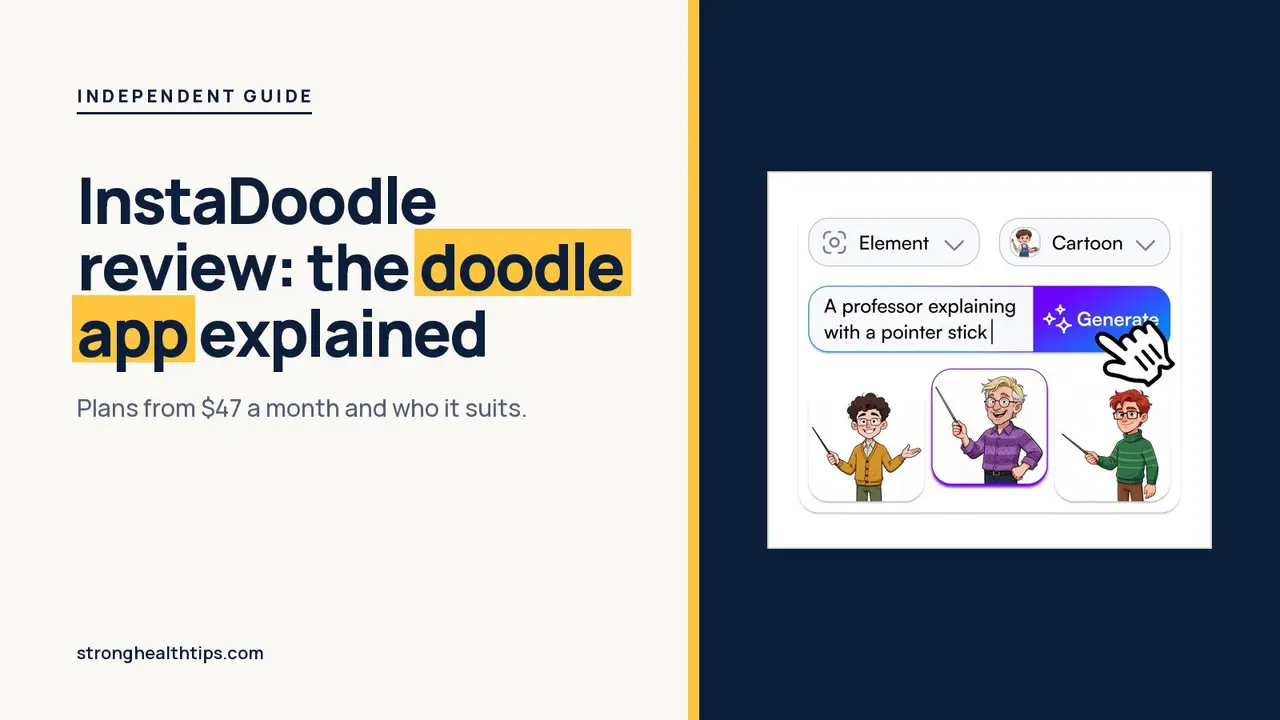
- Write the scene into the prompt box. According to the seller, DoodleAI turns that text into doodle characters, elements and backgrounds.
- Arrange the scene in the drag-and-drop editor. Your own pictures can join the frame, and the image tools include a background remover.
- Choose the motion. The seller lists six animation types: draw, wipe, slide, fade and pop-in.
- Add narration and music. You can generate a voice or supply your own recording, then place background tracks under it.
- Export for the destination. The frame shapes are 16:9, 9:16, 4:5 and square. Standard is listed at 1080p HD, with 2K and 4K reserved for Pro.
Most of the working time falls inside the editor, where scenes play in sequence and keep drawings, narration and music in step. Planning still pays off: a clear idea before the prompt yields a tidier scene, and a rough script on paper cuts down on repeated generations.
Who the tool suits
Three profiles show the fit. A science teacher builds a short clip on how seeds sprout and reuses one drawn character across a unit. A bakery owner records a simple how-to for a new product, with a voiceover and a title card. A team lead makes a welcome video that takes new hires through the first week. The seller names training, onboarding, explainers and educational videos as uses, and all three examples sit inside that list.
Filmed interviews and long live recordings are a separate kind of job. Because InstaDoodle is built around drawn scenes, it suits short explainers more naturally than footage-heavy work.
For teachers and small teams
Pick the plan that matches your videos
Standard, Pro or Agency, each billed monthly, with the order page showing the total.
Compare the three plansPlans, price and refund terms
Every tier is a monthly charge, and the charges repeat until the subscriber ends the plan, according to the seller:
| Plan | Price | What the seller lists |
|---|---|---|
| Standard | $47 a month | 150 AI credits, DoodleAI, 1080p HD, 6 animation types, 14+ templates |
| Pro | $67 a month | Everything in Standard, plus 3,000+ PRO elements, 2K and 4K export, a commercial license, VIP support and a 20-track music bonus |
| Agency | $127 a month | Everything in Pro, plus AI Wizard, InMotion and AI Voices in 30+ languages |
The InstaDoodle hub lays the three tiers side by side. Check the precise plan and figure on the order page before paying, because that page is the live source.
The seller extends a 60-day money-back guarantee, and once more than half of the included AI credits are used, the credits condition removes refund eligibility. To begin a refund request, write to help.instadoodle.com with the subject Refund Request, your account email and order number, and keep the confirmation email handy. Ending a subscription and asking for a refund are separate acts, so handle each one on its own.
Monthly, cancel per the seller
Start a doodle video plan
Describe a scene, add voice and music, then export for the screen you need.
Open the order pageStrengths, then the honest limits
Strengths first:
- Nothing to install: the app runs in a modern browser on Mac, Windows or any device.
- Two starting points, typed prompts and uploaded pictures, both processed through DoodleAI according to the seller.
- Four frame shapes cover a widescreen slide, a vertical story, a square post and a 4:5 feed.
- The tiers scale with volume, and the plan-by-plan list spells out every feature line.
The limits matter just as much:
- A free version does not exist, so the first step is always a paid tier.
- Credits meter the work. The seller says the cost per action can move, so a long project might spend more credits than you planned.
- AI output may fall outside exclusive copyright protection, so check each image and voice line before publishing.
- Commercial rights sit with Pro and Agency, not Standard. Paid client work needs a plan check first.
- Billing repeats monthly until the plan ends, so a one-off project calls for a calendar reminder.
What a first project feels like
Expect the scene list and the narration script to absorb more effort than the buttons do. Choose one idea, such as how a team handles a new client request, and sketch three to five scenes on paper first. Each scene maps to one prompt, one set of elements and one motion choice, which keeps credit use steady.
Visual style deserves thought as well. The seller lists six AI styles, including caricature, cartoon and realistic. A cartoon register suits a classroom, while a realistic one can suit a product walkthrough. Look over every scene before moving on, and confirm that characters stay consistent. When one figure drifts, regenerate just that element, because each regeneration draws on credits.
Finish with a short draft viewed on a phone and a laptop. Check the captions, the voice levels and the closing frame. When the draft holds up on both screens, render the full version at your tier’s resolution.
Before the first order
Write a scene list for one short video so you can estimate its credit use. Produce a brief sample and listen to the voice you plan to use. Then confirm the tier name, the monthly figure and the bonus line on the order page.
A shop owner might start with a single product clip, while a team lead could map a full onboarding series. Either can begin on the same tier and count credits per video before stepping up. Whichever route you pick, a short written plan for the first month keeps the credit count honest.
Where a different tool may suit better
InstaDoodle is not the answer for every video job. Projects built around live footage, screen recordings of software or long talking-head sessions call for a different tool. Choose InstaDoodle when the story can be drawn, sketched and narrated, since that is the territory the seller describes. If your story depends on a real location, a real person speaking on camera or a live demonstration, plan for that footage elsewhere and use InstaDoodle for the drawn explainers around it.
Verdict and score
Our editorial score is 3.8 out of 5. It is our own rating, and the table shows the build-up:
| Area | Our score |
|---|---|
| Price and plan clarity | 3.8 |
| Refund and credit terms | 3.6 |
| Feature detail, as the seller lists it | 4.2 |
| Data and license information | 3.6 |
| Seller’s own counts | 3.8 |
InstaDoodle is a sound fit for teachers, small shops and explainer makers who want drawn video in a browser on a monthly tier. Settle the credits condition before you order, then pick the tier by the features you will truly use. The price breakdown compares the tiers in depth, and is InstaDoodle legit sets out the checks to make first. The InstaDoodle hub keeps the rest of the product material in one place.
Ready when you are
Make your first doodle video
A cloud editor, DoodleAI and monthly plans from $47 a month, cancel anytime per the seller.
See the order pageGood to know
InstaDoodle handles prompts, uploads and projects together with third-party AI providers, so use only material you hold rights to and check AI output before it goes live. Commercial use depends on your tier, and billing continues until you end the subscription.
Questions people ask
What does InstaDoodle cost each month?
The seller lists Standard at $47 a month, Pro at $67 and Agency at $127. The order page shows the exact plan and price before you pay.
How does DoodleAI build a scene?
You type a prompt or upload a picture, and DoodleAI, per the seller, draws characters, elements and backgrounds that you then arrange in the editor.
Can I use the videos commercially?
The seller lists a commercial license on Pro and Agency. Standard does not list it, so read the plan terms before you use a video for clients.
Does the money-back guarantee apply to me?
The seller lists a 60-day money-back guarantee, and a refund is not available if more than half of the included AI credits have been used. Keep your confirmation email.
Do I need to install anything?
No. InstaDoodle is a cloud web app that runs in a modern browser on Mac, Windows or any device.
Should I check the output before publishing?
Yes. The seller says AI output may not qualify for exclusive copyright protection, so review every scene and voice line before you publish it.
Please note. This guide is general information only, not professional, legal or safety advice. Follow local building, electrical and water rules, and use a licensed professional where the law or your safety calls for one. Prices, plans, bonuses and refund terms can change; the official order page is the final word. Full disclaimer.
Written by
Strong Health Tips Editorial Team
We research, write and fact-check every guide against current guidance from major health bodies and peer-reviewed studies, then rewrite it in plain English. How we work.